
I mentioned in a previous post how I use the numpad for most of my aliases/macros when I play MUDs so I thought I’d outline the system I use and how to script it in MUSHclient.
How it works
The basic system maps the numeric keypad to compass directions so I can move my character around just by pressing the relevant key on the numpad, so “8” for north, “3” for southeast, etc. This is fairly standard but my system allows me to modify the behaviour of the numpad key by entering a command first. So for example if I type in “b” and then press “4” on the numpad my client might send “block west”.
The advantage of this system is that it’s very fast; everything is under my fingers and I only need to use two keypresses to send a command to the game compared with an alias like “b w” which is three keys and then enter. The same principle can be used with all directional commands such as swim, sprint, leap, block, look, shoot etc.
Where this system becomes really powerful however is when using the numpad for non-directional commands. As an example I like to use “a” as an alias for my main attacks and in combination with the numpad that gives me up to sixteen attacks I can use with just two keypresses. So for my main attack I might type “a” and then press “1” on the numpad, “a” and then “2” will be a different attack, “a” and then “3” etc. Usually I just use the nine numbers and if this isn’t enough I can have another set in combination with “aa” which although it’s an extra keypress is still very quick to type. I use the same principle for defences (“d” and “dd”) and cures (“c” and “cc”) which gives me up to thirty-two different commands for each.
Scripting in MUSHclient
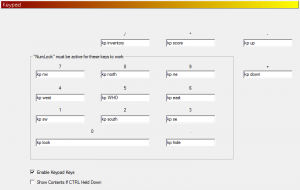
In MUSHclient I bind “kp” followed by the compass direction for each key on the numpad:
And then I use an alias for “kp” to call the script:
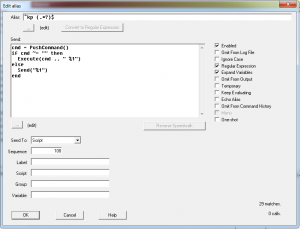
This will send whatever I have typed in the command box followed by the direction whenever I press a key on the numpad, or just the direction if the command box is empty.
You can then create simple aliases for directional commands which will work whenever you type the alias and press a direction on the numpad, eg.
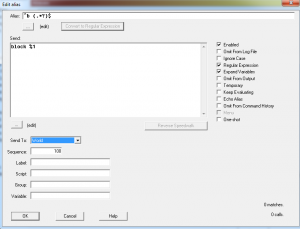
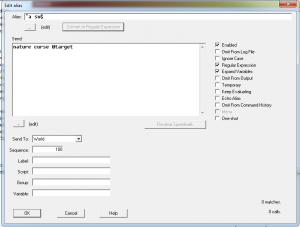
You can also create any arbitrary aliases, so for example I might bind my main attack to “a” and then “1” on the numpad:
Other clients
Right now Mudlet lacks a function to get the contents of the command line which makes this impossible to implement (AFAIK) but see this post for how to modify the source to add it in. I’m not familiar enough with ZMUD or CMUD to know if you can do this with them.

 bcdev.design.blog